
Wondering how long it takes to charge your Ninja portable blender? Most models usually need about two hours to fully power up.
Larger ones like the Blast Max can take closer to three hours.
The charging time can vary based on your battery level and the power source.
Keep reading to find out how your specific model and charger can influence that time.
How Long Does a Typical Ninja Portable Blender Take to Charge?
Most Ninja portable blenders take about two hours to charge fully. This applies to most models, including the Blast line, which has the shortest charging time among them. However, newer or larger models, such as the Blast Max, can require up to three hours. Your current battery level influences this duration: a fully drained battery needs more time to recharge than a partially depleted one. Using the recommended wall adapter speeds up charging, while slower USB sources tend to extend the process. Keep watch on the charging indicator lights to determine when your blender is ready to use. Since design differences and battery sizes vary between models, actual charging times can differ—expect between two to four hours in most cases. For the best charging experience, consult your specific model’s manual rather than guessing. Unlike a blender, a julienne peeler is a fully manual tool that requires no charging at all, making it instantly ready whenever you need it. For comparison, a 40 oz tumbler with handle does not require any charging at all. If you prefer a bottled beverage that requires no electricity, consider selecting the right bottles for your kombucha brew to ensure proper carbonation and storage.

【Compatibility】Replacement for Ninja Blast Max Portable Blender charger ONLY compatible with , please confirm the model of your Portable Blender before placinNinja Blast Max Portable Blender Portable Charger Cords Accessories Parts Replacement Smoothies Charging cl155ard AC Adapter Blender Cupg an order

【Charger Compatible Models】 for Ninja BC251 Blast Max Portable Blender

[Compatible Models] for Ninja Blast Max Portable Blender charger, power charger compatible with Ninja Blast Max BC251 Portable Blender
What Do the Green LED Lights Mean During Charging?
A solid green light indicates the battery is fully charged. This means you can safely unplug the device and start blending without concern. There is no fault or warning sign associated with the green light—it simply shows the current charging status. For those seeking top performance for longer use, also consider professional-grade slushie machines reviewed online. To see this green indication clearly, ensure the charging cable is fully seated in the rear port without any cover interference. Use the included Ninja cable paired with a 5V 3A power supply. If you don’t see any green light at all, first check that your outlet is working and that the connection is secure. Once these are verified, the green light should correctly display the charging status. To maintain the charger’s port, follow quick cleaning routines similar to those for kitchen gadgets to prevent dust buildup. For a comparable at-home option, explore cold brew concentrates made with similar care to the cans from Blue Bottle.
Why Blast Max Models Take Longer to Charge
A Blast Max model takes up to 3 hours to fully charge, which is an hour longer than the standard Ninja Blast. This longer charging time is a deliberate design choice because the larger battery provides increased capacity. More capacity means you can enjoy extra blending sessions per charge, but it also results in a longer wait before reuse. Using the right speed while blending helps achieve smoother results. To keep your Blast Max ready, it’s best to plug it in after each use, preventing the battery from fully depleting and reducing overall charging time for future sessions. For those who prioritize fresh juice, feature-rich models like the best juicer machines for oranges often include high-capacity batteries for extended portability. During the initial charge, you should expect the full 3 hours, and the device will display a solid green light when the charge is complete. The extended charging period supports the higher output and longer runtime of the Blast Max, ensuring you get maximum performance without rushing the process. Unlike a flour sifter, this blender relies entirely on a rechargeable battery for operation.

Whuto cordless immersion blenders offers true portability with its built-in 2000mAh battery. You can easily keep it fully charged,it can be used more than 15 times after charging for four hours ensuring it's always ready when you need it. Whether you're using it at home, in the office, or during outdoor activities like camping, this cordless hand blender immersion provides the flexibility of wireless operation with the reliability of a traditional blender
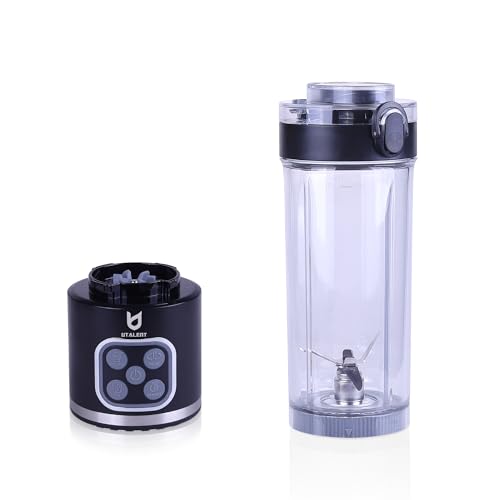
Small size & High power: Portable blender size but with the power of countertop blender, easily blend ice and frozen fruit for delicious smoothies.

EFFICIENT 6-BLADE: This portable blender features 6 sharp stainless-steel blades and a powerful 22000 RPM motor designed to crush fruits, vegetables for shakes and smoothies in 30 seconds. Perfect for protein shakes, breakfast smoothies, and fresh juice—giving you quick nutrition whenever you need it
Does Your Charger Affect Ninja Blast Charging Speed?
The charger you use directly impacts how quickly your Ninja Blast charges. For optimal performance, you should use a 5V 3A power supply. Using a computer USB port or a low-output power bank limits charging efficiency because these sources don’t provide enough power. The blender’s battery capacity stays the same, but the charger determines the refill speed. A proper wall adapter meeting the specifications can fully charge the Ninja Blast in about two hours, aligning with the manufacturer’s guidelines. Using an underpowered charger results in longer charging times, so you’ll need to wait more. The LED indicators reflect this: they turn green when charging completes, but slower charging causes delays in the progress indication. To get the fastest results, always opt for a high-output USB-C wall adapter. Using the original charger or one with equivalent specs ensures high charging efficiency and minimizes wait times.

【FAST CHARGE 3.0 WALL CHARGER】: Besgoods USB fast charger, provides 3A strong power to fast charge compatible devices, charges from 0% to 70% battery in just 45 minutes. It also backwards with non-fast charge devices at 2.4A. (Note: Do not support rapid charge for iPhone series devices. The charging speed may vary based on different phone model.)

【20W Efficient Charging】-The optimized AILKIN USBC plug charger block provides the appropriate power output and is designed to deliver efficient and fast charging for your iPhone 17e, ensuring your iPhone is ready for use when you need it.

【Wide Compatibility】Compatible with Raspberry Pi 4 Model B (1GB/2GB/4GB/8GB). It also works with many other 5V USB-C powered devices up to 15W, offering flexible usage across different electronics.
Is It Safe to Leave Your Ninja Blast Charging Overnight?
Leaving your Ninja Blast charging overnight is generally safe due to its built-in protections, but it’s not recommended to make it a habit. The device’s overcharge safeguards stop the flow of electricity once the LED turns solid green. However, keeping it plugged in all night still puts long-term stress on the battery. For optimal safety and battery longevity, it’s best to unplug the device after the roughly 2-hour charging cycle. Repeated overnight top-offs can accelerate battery wear, increasing the risk of needing a costly replacement sooner. While your Ninja Blast won’t catch fire, regularly overcharging can diminish its lifespan. For a consistent and reliable user experience, choosing a model with blend quality comparable to top-rated countertop units is wise. To keep your battery healthy, unplug once it’s fully charged and you’ll extend its overall usable life. Choosing well-built accessories like a top travel coffee tumbler can also help you maintain quality on the go. For a different creative project, you might explore making a colander light fixture at home using common household items.
Can You Use a Ninja Blast While It’s Charging?
Yes, you can blend while the Ninja Blast is charging. However, keep in mind that when it’s plugged in, the blender relies on its built-in battery management system during use. This means your blending session won’t contribute to charging the battery until you stop. The red or green LED indicators will show when charging resumes—that is, when the battery starts refilling. So, you’re free to blend while connected, but the battery only recharges when the blender is idle.
Where to Find Your Ninja Blast Model’s Exact Charge Time
To find your Ninja Blast model’s exact charge time, start by locating the model number printed on the blender base or its packaging. Once you have the number, consult the official manual or Ninja’s FAQ page to find the specific battery specifications and recommended charging protocols. For example, the BC151 model typically requires about 2 hours to fully charge, while the BC200 and BC250 Blast Max series can take up to 3 hours. Do not rely solely on generic product listings; always cross-check your model code with the manual or official resources. Many product pages list “battery charge time” directly, but verify this information with Ninja’s support FAQs to ensure accuracy. If you’ve misplaced your manual, manual databases are useful, but confirm that the details match your exact model. Relying on official sources helps avoid confusion, especially since charge times can vary slightly depending on the battery’s condition and the power source you use. Always follow the specific instructions for your model series to ensure proper charging and optimal performance.